

Writing title tags and meta descriptions for dozens of pages is one of those SEO jobs that sounds simple until you actually have to do it. One page is fine. Ten pages are manageable. A few hundred pages later, your soul quietly leaves the chat.
That is why this n8n workflow is useful. It takes a list of URLs from Google Sheets, checks which rows are ready for processing, fetches each page, pulls the current title and meta description, sends that information to an AI model, and writes improved suggestions back into the sheet.
Instead of jumping between browser tabs, documents, and spreadsheets, everything stays in one place. You get a repeatable system for reviewing metadata suggestions at scale, which is far more practical than manually rewriting every tag.
What This n8n Automation Actually Does
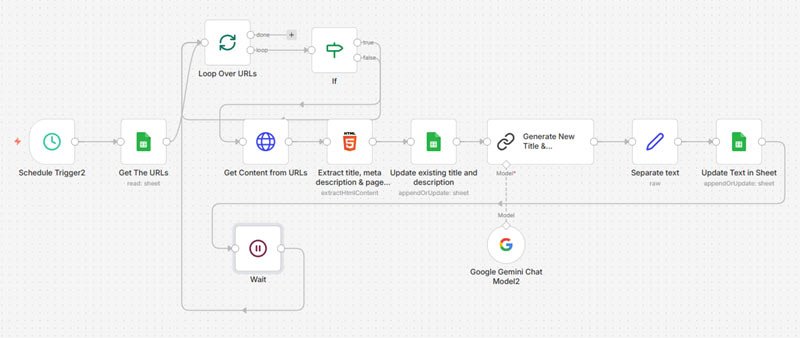
This workflow is built to make metadata updates easier to manage. It follows a clear process from input to output.
- Starts on a schedule inside n8n.
- It reads a list of URLs from Google Sheets.
- Checks the status column and picks rows marked as New.
- Next, it visits the page URL and fetches the HTML.
- Gets the current title, meta description, and page content.
- It then transfers the page details to an AI model with SEO instructions.
- Gets a suggested meta title and meta description.
- It writes those suggestions back into Google Sheets for review.
That means the sheet becomes both the input dashboard and the review panel. It is simple, visible, and easy to manage.
Why This Workflow Is Worth Using
Many SEO tasks are not difficult. They are repetitive. That is the real problem. Metadata work often gets delayed because it is tedious, especially when you are handling large websites, content refreshes, or client projects with too many URLs and too little patience. Think of doing 30,000 title tags for an e-commerce website. It is practically impossible to do manually.
This workflow reduces that manual effort. It does not replace judgment, and it should not. But it gives you a faster way to generate first drafts that can be reviewed, edited, and approved before implementation.
- No more repetitive manual SEO work, primarily for e-commerce websites where you have 1000s of URLs.
- Helps organise metadata updates in one sheet.
- One can review before publishing.
- Great for agencies, freelancers, and internal SEO teams.
How the AI Part Works
The core idea is simple. The workflow sends the current page details to an AI model, which generates cleaner, more useful metadata based on a few rules.
In this setup, the AI is asked to create:
- meta title under 60 characters
- meta description under 150 characters
- The title puts important keywords early
- It creates a description that is clear, relevant, and readable
- Response in strict JSON format
The structured output matters because n8n workflows perform much better when the model returns clean JSON. The expected format looks like this:
{"meta_title":"Your Title Here","meta_description":"Your description here"}That makes parsing easier and reduces the chances of the workflow breaking because the AI decided to become a motivational speaker.
n8n Nodes Used in the Workflow
This automation uses a practical mix of n8n nodes that fit this use case well:
- Schedule Trigger
- Google Sheets
- Split in Battches
- If
- HTTP Request
- HTML Extract
- LLM Chain
- Set
- Wait
These nodes create a workflow that is easy to understand and easy to adapt. You can expand it later with approval steps, validations, or keyword analysis if needed.
What I Like About This Setup
- Processes rows marked as New, which keeps the run focused.
- Writes results back into the same Google Sheet, so nothing gets scattered.
- Uses AI for draft generation, not blind publishing.
- Works in batches, which is safer for larger URL lists.
- It follows a clean flow that can be improved without rebuilding everything.
That combination makes it useful for actual SEO work, not just for demo screenshots that look nice and then collapse the moment you try them on an actual site.
Ways to Improve This Workflow Further
The workflow is already useful, but a few small upgrades could make it even more reliable.
1. Feed More Page Content Into the Prompt
If the AI sees a better summary of the page content, the metadata suggestions will usually be more accurate. Using only the current title and description is helpful, but not always enough.
2. Add Character Count Checks
The prompt tells the AI to stay within length limits. However, a validation step in n8n would add another layer of control. Rows with titles or descriptions that exceed the limits could be flagged or redone.
3. Handle Errors More Clearly
Some pages will block requests, return incomplete HTML, or fail to load properly. The workflow should update those rows with an error status so they can be reviewed later.
4. Add a Review Status Column
You can add columns such as Approved, Needs Edit, or Published to make the sheet more useful as a lightweight metadata workflow manager.
5. Include Keyword or Intent Notes
For deeper SEO use, the workflow could also store the likely keyword focus or search intent for each page. That would help reviewers decide whether the AI suggestion actually corresponds to the page.
Who This Workflow Is Best For
This kind of automation is useful for anyone who deals with metadata at scale.
- SEO freelancers handling multiple client websites
- Digital marketing agencies doing content refresh projects
- In-house teams updating old pages
- Bloggers managing large content collections
- No-code builders creating SEO support systems
Free Download of the Workflow JSON
I created a cleaned version of the workflow JSON so it can be shared publicly without exposing private references.
Download the n8n workflow JSON
Frequently Asked Questions
Is this workflow beginner-friendly?
Yes. The logic is fairly easy to follow, especially if you already know the basics of Google Sheets and n8n. You can also modify it bit by bit without changing the entire structure.
Does this automatically publish the new metadata on the website?
No. This workflow generates suggestions and writes them back into Google Sheets. That is actually a good thing because it gives you an opportunity to review everything before making changes on the site.
Can this be used for client SEO work?
Yes. It is especially useful for agencies and freelancers who want a repeatable metadata workflow for multiple projects.
Can I adapt it for product pages or blog posts?
Yes. As long as the page content can be fetched and parsed, the workflow can be adjusted for different page types.
Should AI-generated metadata be reviewed by a human?
Absolutely. AI speeds up drafting, but final review matters. A fast, bad title is still a bad title. It just arrives earlier.
Final Thoughts
This n8n workflow solves a very practical SEO problem. It helps you move faster. It further help to stay organised, and generate metadata suggestions in an easy-to-review format.
It is not magic, and it is not a replacement for good SEO thinking. But it does remove a repetitive task that eats up time for no good reason. For teams that handle a lot of pages, that alone makes it worth testing.
If you want a simple way to combine Google Sheets, AI, and n8n for SEO operations, this is a solid place to start.
